TreeMaps – Java Collections Framework

If you want to save a sequence of key/value pairs and if you want them ordered by the key, what would be your ideal option? Don’t have an idea? Don’t worry. Let’s talk about that today.

Hello coders, I am back with a new article in my Java Collections Framework article series. Today I am going to discuss TreeMap class in Java. TreeMap class extends the SortedMap Interface and that extends the Map Interface.

HashMaps vs TreeMaps

TreeMaps are considerably similar to HashMaps. There are two main differences between these two classes.

  1. HashMaps are implemented as a Hash Table. TreeMaps are implemented based on Red-Black Tree Structure

If you are not aware of Hash Tables and Red-Black Tree Structure, please refer to the linked articles to get a better idea. I will be talking about Hash Tables later in this article series as well.

  1. HashMap does not maintain order. TreeMaps are ordered by the key.

Here is a small code snippet that explains the difference between HashMaps and TreeMaps.

        //Creating a TreeMap
        TreeMap<Integer, String> myTreeMap = new TreeMap<>();

        myTreeMap.put(34, "Smith");
        myTreeMap.put(62, "Virat");
        myTreeMap.put(1, "Marnus");
        myTreeMap.put(8, "Stokes");
        myTreeMap.put(2, "Williamson");

        System.out.println("TreeMap : " + myTreeMap);

        //Creating a HashMap
        HashMap<Integer, String> myHashMap = new HashMap<>();

        myHashMap.put(39, "Smith");
        myHashMap.put(61, "Virat");
        myHashMap.put(9, "Marnus");
        myHashMap.put(13, "Stokes");
        myHashMap.put(4, "Williamson");

        System.out.println("HashMap : " + myHashMap);
TreeMap : {1=Marnus, 2=Williamson, 8=Stokes, 34=Smith, 62=Virat}
HashMap : {4=Williamson, 39=Smith, 9=Marnus, 61=Virat, 13=Stokes}

Similarities

  1. Both are unsynchronized and should be synchronized explicitly to be used in a thread-safe environment
  1. Only contains unique elements. (Key should be unique)
  1. Keys can’t be null. Values can be null.
        //Creating a TreeMap
        TreeMap<Integer, String> myTreeMap = new TreeMap<>();

        myTreeMap.put(34, "Smith");
        myTreeMap.put(62, "Virat");
        myTreeMap.put(null, "Bro"); // Causes NullPointerException
        myTreeMap.put(4, null); //This is fine

        System.out.println("TreeMap : " + myTreeMap);
  1. Methods are almost the same.

I am not going to list down the methods here. You can take a look at all the available methods here in the Java Documentation


Now you know where to go to when you want to store key/value pairs ordered by the key.

Thank you for reading my article. I hope you learned something valuable from it. If you did, drop a like and follow my blog to get notifications when I publish new articles. I write articles about coding, cricket and things that I find interesting. I try to publish articles every other day. Have a nice day ✌


5 Life-Changing Advice from Billionaires

Hello guys, today I am going to talk about life lessons from billionaire entrepreneurs. These are things they’ve learned from experience in their amazing journey to success. As I always say, all of these pieces of advice might not be for you. You might be able to utilize these pieces of advice in your life journey.

Don’t directly add anything to your life and hope for it to change your life. Every one of us is different. We all have different lifestyles and different backgrounds. Experiment with these pieces of advice. If it doesn’t suit you, leave it.

Let’s get into the article.

1. Persevere

Life is not going to be a bed of roses. There is going to be times where you are going to feel down and out. There is going to be times where you feel like stopping. But don’t.

This is the corridor where most of us fail to go through. This is the reason why only 1% of the world population has become successful.

Here me out and say if this has happened to you too. You watched some crazy transformation video on YouTube. You look at yourself and say, “I wanna be like that. I can do that. I want a body like that”. So, you go and join the gym the next day. You are so pumped. You go to the gym for a week or two or maybe a month. On a gym day, one of your friends invites you to go to a party. You think to yourself, “There is no harm in skipping a day”. Next thing you know, you haven’t gone to the gym in a few months and you are watching motivational videos on YouTube.

I bet most of you guys have experienced something like this. Do you know why that happened? That happened because external motivation is crap. Motivation is good to make you get started. But it is going to fade away soon. On that day when your motivation comes down to zero, you are going to find whether you really have what it takes to build that amazing body. And that must come from inside of you. You need to know how to motivate yourself. You need to find out how you can persevere through this mental barrier. You’ve got to do that again and again.

2. Find a Strong Why

This one also can be associated with the last point. The main reason you fail when your motivation reaches zero is that you don’t have a clear vision.

The first thing you need to do is finding your Why. Let’s get back to that workout example. If the only reason why you are building your body is that someone made fun of your body, you are going to fail at some point. That is not a strong why. Your why should be a long term goal like getting fitter than yesterday or a short term goal like losing 10 kilos at the end of this month. These goals are more achievable and realistic. You can motivate yourself to get to realistic goals.

Listen to this amazing speech from one and only Arnold Schwarzenegger.

Video Source – Alpha Leaders Productions YouTube Channel

3. Have Humanity

In my opinion, this is something that is slowly getting away from today’s society. George Floyd incident was an eye-opening moment for everyone in the world to see how society has changed. I am not saying that society was better in the past. But it surely is not getting any better.

We all are going after money and fame. Yes, money is important. But there is a point where you earn enough to live your day-to-day life happily. That is enough. Most of the people are circling through a vicious cycle. When we want to earn more and more, we only get more greedy and inhumane. Today’s society has come to a point where a person would kill someone else for a few hundred bucks.

You are not going to take your money with you when you die. Always try to help people to get to a better place in their lives. In the end, your mental satisfaction is going the that is going to stay with you when you die.

4. Work Hard and Smart

Everyone says that you should work smart and not hard. But billionaires believe that both are equally important. Bill Gates once said that he didn’t believe in weekends when he was in his 20s. This is a common thing among most of the billionaires. They have dedicated their whole life to get to where they are in their lives.

What I mean by work hard and smart is that you need to be smart to choose the thing that you should be working on at the moment. And you need to focus on that task and work hard to achieve that goal.

5. Do what you Love

When you are choosing a career path, always choose a career which you are interested in. Do not choose a career just because it pays well. When you choose something you love, the money will come towards you.

When you do something you love and something you are really interested in, you won’t really feel it as working. You will be able to work really hard and still be motivated. You will not feel tired. When you work like that, the money will come to you. You will not even care because you are not doing it for the money. You are doing it for your own satisfaction


Thank you for reading my article. I hope you learned something valuable from it. If you did, drop a like and follow my blog to get notifications when I publish new articles. I write articles about coding, cricket and things that I find interesting. I try to publish articles every other day.
Have a nice day ✌
HashMaps – Java Collections Framework

Hello coders, I am back with a new article in my Java Collections Framework article series. Today, I am going to discuss the HashMap class in Java. HashMap extends the Map interface in Java. Let’s learn about HashMaps.

What is HashMap?

HashMap is a class that is being used for data mapping. We use HashMaps to store data in key & value pairs. HashMaps do not maintain order. So, you should not use HashMaps, if you expect your list to keep order. In addition, HashMaps allow null values and this implementation is not synchronized.

Let’s learn how you can use HashMaps to store data.

HashMap Class Methods

1. value put(key, value)

This will add a key and value pair to the map. The method returns the value that was paired with the given key earlier. If the given key was never used in the map before, it will return null.

        //Creating HashMap
        HashMap<Integer, String> myHashMap = new HashMap<>();

        //Adding values
        myHashMap.put(1, "Thisura");
        System.out.println(myHashMap.put(2, "Mahela"));
        System.out.println(myHashMap.put(2, "Sanga"));

Here is the console output.

null
Mahela
2. value get (Object key)

This method returns the values paired with the given key.

        //Creating HashMap
        HashMap<Integer, String> myHashMap = new HashMap<>();

        //Adding values
        myHashMap.put(1, "Thisura");
        myHashMap.put(2, "Mahela");
        myHashMap.put(3, "Sanga");

        System.out.println(myHashMap.get(3));

Here is the console output

Sanga
3. boolean isEmpty()

This method returns true if the map is empty.

        //Creating HashMap
        HashMap<Integer, String> myHashMap = new HashMap<>();

        //Adding values
        myHashMap.put(1, "Thisura");
        myHashMap.put(2, "Mahela");
        myHashMap.put(3, "Sanga");

        System.out.println(myHashMap.isEmpty());

Here is the console output.

false
4. boolean containsKey (Object key)

This returns true if the given key is there in the map.

        //Creating HashMap
        HashMap<Integer, String> myHashMap = new HashMap<>();

        //Adding values
        myHashMap.put(1, "Thisura");
        myHashMap.put(2, "Mahela");
        myHashMap.put(3, "Sanga");

        System.out.println(myHashMap.containsKey(2));

Here is the console output.

true
5. boolean containsValue(Object value)

This returns true if the given value is there in the map.

        //Creating HashMap
        HashMap<Integer, String> myHashMap = new HashMap<>();

        //Adding values
        myHashMap.put(1, "Thisura");
        myHashMap.put(2, "Mahela");
        myHashMap.put(3, "Sanga");

        System.out.println(myHashMap.containsValue("Sanga"));

Here is the console output.

true
6. Set keySet()

This method returns the set of keys in the map.

        //Creating HashMap
        HashMap<Integer, String> myHashMap = new HashMap<>();

        //Adding values
        myHashMap.put(1, "Thisura");
        myHashMap.put(2, "Mahela");
        myHashMap.put(3, "Sanga");

        System.out.println(myHashMap.keySet());

Here is the console output.

[1, 2, 3]
7. int size()

This returns the size of the map.

        //Creating HashMap
        HashMap<Integer, String> myHashMap = new HashMap<>();

        //Adding values
        myHashMap.put(1, "Thisura");
        myHashMap.put(2, "Mahela");
        myHashMap.put(3, "Sanga");

        System.out.println(myHashMap.size());

Here is the console output.

3
8. value remove(Object key)

This method removes the key and value pair according to the specified key and returns the values that key was paired to.

        //Creating HashMap
        HashMap<Integer, String> myHashMap = new HashMap<>();

        //Adding values
        myHashMap.put(1, "Thisura");
        myHashMap.put(2, "Mahela");
        myHashMap.put(3, "Sanga");

        System.out.println(myHashMap.remove(2));
        System.out.println(myHashMap);

Here is the console output.

Mahela
{1=Thisura, 3=Sanga}

I believe these methods are the important ones you should know to get started with HashMaps. If you are interested in learning more about HashMaps, go ahead and read the Java documentation here.


I am going to wrap up this article here. Thank you for reading my article. I hope you learned something valuable from it. If you did, drop a like and follow my blog to get notifications when I publish new articles. I write articles about coding, cricket and things that I find interesting. I try to publish articles every other day. Have a nice day ✌

Set Interface – Special Article 02

Hello fellow coders, I am back with my second article of our Java Collections Framework article series. So far we have covered all the classes that extend the Set interface and List interface.

If you can remember I wrote my first special article after covering the classes that extend the List interface. Since I have covered the classes that extend the Set interface, I am dedicating this special article to point out important points about the Set interface.

When it comes to the classes that extend the Set interface, these are the points you should keep in mind.

1. They do not keep track of the order

There is no way to track and get your elements after you add them. Basically do not use the classes that extend the Set interface, if you want to access the elements by index or something. You can go with a class that extends the List interface for that.

2. They do not allow duplicate values

This is a unique and important point that is specific to the Set interface. If your requirement is to have a list where you are sure that all the values are unique, a class that extends the Set interface is your best bet.

3. HashSet is faster than TreeSet

If you don’t intend to use value-ordered iteration, always go with a HashSet. LinkedHashSet is a class that is in an intermediate state between HashSet and TreeSet. LinkedHashSet provides insertion-ordered iteration and is faster than TreeSets.

4. Choose the initial capacity for HashSet mindfully

Read this explanation from Java Documentation.

One thing worth keeping in mind about HashSet is that iteration is linear in the sum of the number of entries and the number of buckets (the capacity). Thus, choosing an initial capacity that’s too high can waste both space and time. On the other hand, choosing an initial capacity that’s too low wastes time by copying the data structure each time it’s forced to increase its capacity. If you don’t specify an initial capacity, the default is 16. In the past, there was some advantage to choosing a prime number as the initial capacity. This is no longer true. Internally, the capacity is always rounded up to a power of two. The initial capacity is specified by using the int constructor.

Common Methods for Set Interface Implementations

1. boolean add (Element e)

Adding a given element to the set.

2. void clear()

Removes all the elements from the set

3. boolean contains(Object obj)

Checks if a given object is there in the set

4. boolean isEmpty()

This returns true if the set is empty

5. boolean remove(Object obj)

If the specified object is present in the list, this removes that element from the set and returns true. If the specified object is not there in the list, this returns false.

6. int size()

This returns the number of elements in the set


Thank you for reading my article. I hope you learned something valuable from it. If you did, drop a like and follow my blog to get notifications when I publish new articles. I write articles about coding, cricket and things that I find interesting. I try to publish articles every other day.
Have a nice day ✌

6 Biggest Motivation Killers You Should Avoid

Hello guys, today I am going to talk about the biggest motivation killers in life and how you can avoid them. You may already have come to realize these motivation killers at some point in your life. The good news is that I am going to teach you guys tips on how to avoid them as well. Without further ado, let’s hop in.

1. Pessimism

Be Optimistic

Image Source

We all have met that person who whines about everything that goes on his life. I’ve met a lot of pessimistic people. I even have found myself stuck in a pessimistic mindset in some situations. Being optimistic does not mean that we should try to avoid and ignore stressful situations. It just means that we should try to be more productive in that given situation.

One proven technique to be more optimistic is to change the way you look at life events. If you find yourself being pessimistic, make yourself realize that there might be a better way to look at this. For example, think of a rainy day. If you are a pessimistic person, you might think, “This is horrible. I am not going to be able to do anything I had in mind. Oh, this is terrible. Why everything is happening to me?”. If you are an optimistic person, you might think, “Yeah. This is awesome. I can just relax and watch some movies today. Then I can read a book. I could cuddle close to my girlfriend the whole day”.

Do you see the difference? You see things the way you want them to be seen.

Another technique you could use is keeping a list to write down the things you have achieved in your life. You can either write it online or in a piece of paper. Read this list when you feel like you are being pessimistic. When you keep reading these achievements, you are enforcing positive emotions in your mind. This will keep you motivated and optimistic.

Another thing to keep in mind is that both negative and positive emotions are contagious. So, keep an eye on your social circle and get rid of the people who are pessimistic or teach them these techniques to become an optimistic person.

2. Don’t Limit Yourself. Explore

Explore

Image Source

You are making your limitations. You can achieve whatever you believe in. Nelson Mandela once said, “It always seems impossible until it’s done“. The only thing that is standing between you and success is you.

There is nothing impossible in this world. Don’t give up at something without even trying. Doing something is always better than procrastinating.

Stop feeling sorry for yourself. No one is going to come to save you. You are going to have to do it for yourself. We tend to procrastinate when we don’t have a clear vision of what you are trying to achieve.

Besides, try something new which is out of your comfort zone. This is harder than it sounds. But when you are done, you will feel so confident and awesome more than ever.

You can start by making a list of your fears and giving yourself small challenges that make you break out of your comfort zone. The more you break out of your comfort zone, the bigger it grows. Always try to widen your comfort zone.

3. Don’t Look for Excuses

When something goes wrong in your life, do not try to blame others. Do not try to find excuses. Learn to take responsibility for everything that happens in your life. When you learn to do this, everything becomes more clear.

When you stop looking for excuses, you will find the real reason why you failed and then you can make sure not to repeat it ever again. If you try to find excuses, you are never going to grow.

4. Lack of Planning

Plan your day

Image Source

I’ve said this many times in my earlier articles as well. You should always plan out your day from start to finish. This is going to stop you from procrastinating and will motivate you to get things done.

Just write down your goals for the day. Break them down to small actionable steps. Allocate time slots for each of those tasks and start your day.

5. Concentrating on previous Failures

Image Source

Everyone fails in their lifetime. Failing is nothing to be ashamed of. You don’t become a failure when you fail at something. You become a failure when you give up.

The only person who does not fail in this world is the person who doesn’t try anything new. The only way to grow is by making mistakes. You can’t make mistakes if you don’t try.

When you fail at something repeatedly, your inner-voice is going to say that you are going to fail again. You need to have the guts to say, “F**k it. I am going to do it again. I am not going to stop until I do this”.

Another thing that divides successful people from others is that ordinary people stop when they are tired. But successful people stop when they are done.

6. Worrying about What Others Think

Stop Thinking about What Others Think of You

Image Source

No matter how hard you try, you can’t please everyone. You have to accept it and move on with your life. Whatever you do, there is going to be that person who doesn’t support you.

When you are yearning for the acceptance of other people, you are going to forget who you are. Make choice based on how you want your life to be, not on what other people want it to be. This also happens when you don’t have a clear vision. When you know where you are going and how you can get there, nothing can stop you.

I would love to recommend this article of mine for you guys, to get more insight on this.


Thank you for reading my article. I hope you learned something valuable from it. If you did, drop a like and follow my blog to get notifications when I publish new articles. I write articles about coding, cricket and things that I find interesting. I try to publish articles every other day.
Have a nice day ✌

TreeSets – Java Collections Framework

Hello coders, I am back with another article in my Java Collections Framework article series. Today I am going to discuss our 3rd and final class that implement the Set Interface which is TreeSet class. TreeSet is quite similar to the HashSet class we talked about earlier.

Since you already know about the HashSet class, I am going to discuss the similarities and differences between the two classes to give you a clearer idea.

Similarities

1. Doesn’t allow duplicate elements

Both HashSet and TreeSet objects do not allow duplicate elements. If we insert duplicate elements, the existing elements will be overwritten.

        //Creating TreeSet and HashSet objects
        TreeSet<String> myTreeSet = new TreeSet<>();
        HashSet<String> myHashSet = new HashSet<>();

        //Adding elements to the TreeSet
        myTreeSet.add("Nicola Tesla");
        myTreeSet.add("Elon Musk");
        myTreeSet.add("Thomas Edison");
        myTreeSet.add("Gary V");
        myTreeSet.add("Elon Musk");
        System.out.println(myTreeSet);

        //Adding elements to the TreeSet
        myHashSet.add("Nicola Tesla");
        myHashSet.add("Elon Musk");
        myHashSet.add("Thomas Edison");
        myHashSet.add("Gary V");
        myHashSet.add("Elon Musk");
        System.out.println(myHashSet);

Here is the console output. If you look carefully, you might be able to notice one of the differences between these two classes as well. Don’t worry if you don’t. I am going to explain it in the latter part of the article anyway.

[Elon Musk, Gary V, Nicola Tesla, Thomas Edison]
[Thomas Edison, Gary V, Nicola Tesla, Elon Musk]
2. Both are not synchronized

Both classes are non-synchronized classes which means that they are not thread-safe.

Differences

1. Maintaining an order

HashSet class do not maintain order while the TreeSet class maintains the ascending order. If we look at the earlier code snippet, we can clearly see the difference. We can see the TreeSet maintaining the ascending order while HashSet don’t.

[Elon Musk, Gary V, Nicola Tesla, Thomas Edison]
[Thomas Edison, Gary V, Nicola Tesla, Elon Musk]
2. Performance

When it comes to performance, the HashSet class is in front. HashSet class provides a faster performance when performing general CRUD operations.

Converting HashSets into TreeSets

If you want, you can convert HashSets into TreeSets. This can be useful when you want to sort the elements in a HashSet. You can simply convert your HashSet into a TreeSet in order to sort the elements in ascending order.

        //Creating TreeSet and HashSet objects
        HashSet<String> myHashSet = new HashSet<>();

        //Adding elements to the TreeSet
        myHashSet.add("Mahela");
        myHashSet.add("Sanga");
        myHashSet.add("Dasun");
        myHashSet.add("Mavan");
        myHashSet.add("Dilshan");
        System.out.println(myHashSet);

        TreeSet<String> myTreeSet = new TreeSet<>(myHashSet);
        System.out.println(myTreeSet);

Here is the console output.

[Dasun, Sanga, Mavan, Dilshan, Mahela]
[Dasun, Dilshan, Mahela, Mavan, Sanga]

If you want to know more about the TreeSet class, refer to the Java Documentation.


This ends the article about the TreeSet class. If you liked the article, drop a like and follow my blog. If you have any doubts, drop a comment down below. Stay Safe ✌

5 Tips on How to Become an Everyday Leader

Hello guys, today I am going to give you some important tips to become an everyday leader. You may have noticed that some people take the responsibilities and boss the situation wherever they go. If you want to be that guy, you need to adapt these things to your life so you can boss the situation next time.

1. Learn about yourself first

Before you lead other people, you need to sort things out for yourself. People are more likely to listen to a person who has his shit together. Find your passion and start working on it. You always need to have a clear vision on what you should and should not do at a given situation.

Be a Man with a Plan

Image Source

When you learn about what you are passionate about, you can seek out opportunities to meet other people who have the same passion as you do.

2. Listen to other people

Listen to other people

Image Source

One of the most important qualities of a great leader is listening to what others have to say. You should always prefer to talk less and listen to more people. Listen to experts, colleagues and even to the people who disagree with your opinions. It does not matter whether they like you or not. What matters is that you get to learn their insights, perspective and experiences.

When you know how other people think and listen to their personal experiences, you will get to understand the people better. When you understand people better, you can lead them better. Besides, when you listen to others’ opinions, they automatically start to like you.

3. Speak Up

Speak Up

Image Source

You need to realize that leaders don’t talk things without thinking about them first. You can’t do that if you are going to be a leader. People are looking up to you. You should always set an example on how to go on in your life.

When you are sharing your opinion, whether it is in front of an audience or social media, always try to make your opinion clear and concise. This is another skill that you should master when you are becoming a good leader. You need to learn how to express your opinion constructively.

This makes you stand out from other people. As long as you believe in what you stand for, people will join by your side.

If people are already discussing something, go ahead and tell them what you perspective is. Try to add something fresh to the conversation. You will automatically be able to lead the conversation to a place where you are comfortable.

4. Failure is a muscle

Workout your Failure Muscle

Image Source

You need to understand that you are going just like everyone else is. Failure is like training a muscle. We go to the gym to workout and build our muscles. When you workout, you damage your muscle fibers. In the end, this process makes our muscles stronger.

Failure is just the same as training a muscle. When you fail, you get to learn about something what you should not have done. You get to correct yourself. In the end, failure is going to make you a stronger person.

So, you should always be willing to fail. You are not going to fail, if you don’t try. And if you don’t fail, you won’t get to become a stronger version of yourself. Always be willing to try out different things.

5. Smile

Smile with People

Image Source

Smile is the most powerful tool a person has. Everyone likes to be around a leader who smiles with them and makes them feel good inside. Even though this is a regular tip, you will realize how many people ignore this tip.


Thank you for reading my article. If you enjoyed it, drop a like and follow my blog. Stay safe ✌

LinkedHashSets – Java Collections Framework

Hello coders, today I am going to talk about another class that implements the Set interface in Java called LinkedHashSet.

Points to Notice

1. Contains Unique Values (Like HashSets)

LinkedHashSets also contain unique values. If we try to duplicate a value, the existing value gets overwritten by the new value.

        //Creating a LinkedHashSet
        LinkedHashSet<String> myLinkedHashSet = new LinkedHashSet<>();

        //Adding Elements
        myLinkedHashSet.add("Joey");
        myLinkedHashSet.add("Chandler");
        myLinkedHashSet.add("Ross");
        myLinkedHashSet.add("Monica");
        myLinkedHashSet.add("Chandler");
        System.out.println(myLinkedHashSet);

Here is the console output.

[Joey, Chandler, Ross, Monica]
2. Allows null values (Like in HashSets)
        //Creating a LinkedHashSet
        LinkedHashSet<String> myLinkedHashSet = new LinkedHashSet<>();

        //Adding Elements
        myLinkedHashSet.add("Joey");
        myLinkedHashSet.add("Chandler");
        myLinkedHashSet.add(null);
        myLinkedHashSet.add("Ross");
        myLinkedHashSet.add("Monica");
        myLinkedHashSet.add("Chandler");
        myLinkedHashSet.add(null);
        System.out.println(myLinkedHashSet);

Here is the console output.

[Joey, Chandler, null, Ross, Monica]
3. Saves values according to the Insertion Order

The LinkedHashSet saves values according to the order we add them. This makes it stand out from the HashSet class.

        //Creating a LinkedHashSet
        LinkedHashSet<String> myLinkedHashSet = new LinkedHashSet<>();

        //Adding Elements
        myLinkedHashSet.add("Joey");
        myLinkedHashSet.add("Chandler");
        myLinkedHashSet.add(null);
        myLinkedHashSet.add("Ross");
        myLinkedHashSet.add("Monica");
        myLinkedHashSet.add(null);
        myLinkedHashSet.add("The Ugly Naked Man");
        myLinkedHashSet.add("Ursula");
        myLinkedHashSet.add("Emily");
        System.out.println(myLinkedHashSet);

Here is the console output.

[Joey, Chandler, null, Ross, Monica, The Ugly Naked Man, Ursula, Emily]
4. Non-synchronized

Methods

LinkedHashSet class implements all the methods that are being used in HashSets. You can take a look at my HashSet article to read and learn about them.

Besides, I always recommend you to read the Java documentation for further details. Here is the link to LinkedHashSet class documentation.

Thank you for reading the article. I hope you got a good understanding of LinkedHashSets. If you liked it, drop a like and follow my blog. Stay Safe ✌

HashSets – Java Collections Framework

Hello guys, I am back with our 4th article in my article series regarding the Java Collections Framework. Today I am going to educate you guys about the HashSet class in Java. Let’s get into the article.

Characteristics

HashSet class implements the Set interface in Java. The main thing you need to know about HashSets is that they do not guarantee to keep a certain order. This is one of the reasons why it only has a limited number of methods.

HashSet class is not synchronized. We can add null elements to HashSet. Also, there is a special functionality in HashSets. We can’t add duplicate values to HashSets. If we add a duplicate value, it will automatically overwrite the existing value. The same thing applies even if we try to add a null value.

Let me demonstrate some of the characteristics with some examples.

Does not maintain any order
        //Creating a HashSet
        HashSet myHashSet = new HashSet();

        //Adding Elements
        myHashSet.add("Joey");
        myHashSet.add("Chandler");
        myHashSet.add("Ross");
        myHashSet.add("Monica");
        System.out.println(myHashSet);

        myHashSet.add("Rachel");
        myHashSet.add("Pheobe");
        myHashSet.add(null);
        System.out.println(myHashSet);

        myHashSet.add("Gunther");
        System.out.println(myHashSet);

Here is the console output for the above code snippet.

[Joey, Ross, Chandler, Monica]
[null, Rachel, Pheobe, Joey, Ross, Chandler, Monica]
[null, Gunther, Rachel, Pheobe, Joey, Ross, Chandler, Monica]

As you can see, the null value has come to the beginning of the list, even though we did add elements after adding the null value.

Can’t Add Duplicates
        //Creating a HashSet
        HashSet<String> myHashSet = new HashSet<>();

        //Adding Elements
        myHashSet.add(null);
        myHashSet.add("Joey");
        myHashSet.add("Chandler");
        myHashSet.add("Ross");
        myHashSet.add("Monica");
        myHashSet.add("Monica");
        System.out.println(myHashSet);

        myHashSet.add(null);
        System.out.println(myHashSet);

Here is the console output for this example.

[null, Joey, Ross, Chandler, Monica]
[null, Joey, Ross, Chandler, Monica]

You can clearly see even though we add duplicate elements in the code, there are no duplicates in the list.

Methods

1. boolean add (Element e)

We can add elements to the HashSet using this method. The method will return true if the process was successful. So, if we are trying to add a duplicate element, this will return false since the process was not successful.

2. void clear()

We can clear the whole HashSet using this method.

3. boolean contains (Object obj)

This returns true if the specified object is there in the HashSet.

4. boolean isEmpty()

This returns true if the HashSet is empty

5. boolean remove(Object obj)

If the specified object is present in the list, this remove that element from the HashSet and returns true. If the specified object is not there in the list, this returns false.

6. int size()

This returns the number of elements in the set

You can always refer to Java Documentation for more details.


Alright coders, this ends my article about HashSet class in Java. If you learned something new, drop a like and follow my blog. Stay Safe ✌

The Art of Giving Constructive Criticism

Hello guys, in today’s article, I am going to discuss the art of giving constructive criticism. This is going to be one of the most important tools you need especially when you are in a working environment. Have you ever wanted to give constructive criticism, but couldn’t because you didn’t know how to properly convey your idea?

Let me teach you how to do it in 6 simple steps. Let’s hop in.

Why should we learn to give Constructive Criticism?

Constructive criticism is one of the best ways a person can improve. This gives us a new perspective and makes us see the things that we oversaw or didn’t even consider before. Constructive criticism is especially beneficial at work since it shows that your managers and peers care for you and wants to see you succeed.

Everyone makes mistakes. It is really normal to make mistakes in a working environment. What matters is how you are going to point it out. You can either just blame him which would make him feel bad or you could give him constructive criticism. If you wanna go with the second option, let me show you the way.

1. Use the PIP Sandwich

PIP stands for Positive-Improvement-Positive. This means that we are sandwiching our criticism between two positive comments.

So, first of all, you have to start your comment by focusing on your strengths. After that, provide your criticism and point out where he could improve. And you can finish by telling about what positive things he can expect if he acts upon the problem.

You may have seen people use this technique everywhere. For example, judges in reality shows use this technique all the time when commenting on auditions.

When we use this PIP sandwich to give our feedback, they understand that we are on their side. They would understand that we know what they did correctly and that we appreciate it. And they would also understand that you just want them to succeed by correcting their mistakes.

2. Focus on the situation, not the person

This is also one of the most important tips you should definitely consider using. If the person feels like that they are being accused, our criticism is more likely to be dismissed. This happens automatically because the victim feels like they are being targeted.

A simple example is that if someone says, “You look ugly”, we take it personally. But if someone says, “Those clothes don’t suit your body type”, we are more likely to focus on picking out different clothing. These simple things are quite valuable when we want to get our idea across without affecting them negatively.

Using passive voice also can be a great trick to get your idea across. When we use passive voice, we are less likely to mention a person’s name. So, the next time you are confronted with a situation where you have to give someone constructive criticism, try to stick to passive voice.

And also, explaining your side of the story is also a great technique to implement. This way the victim will realize the reason why you decided to speak up. You can tell him how this affected you and your work. The victim will feel guilty and will never repeat that same mistake again.

3. Be Specific

When you are trying to give your constructive criticism, try to be specific as possible. Because when you are specific, the victim is more likely to take action to fix it. When you say something vaguely, the victim won’t know what you really mean. He might even second guess himself about the things he did well. So, try to be specific. Make the process easier and actionable as possible for the victim.

For example, If you say, “Your coding style is bad”, the victim will question his programming knowledge and try to learn more. But he might never understand what you meant. If you specifically say, “You are adding comments properly. Read online resources on how to comment when coding”, he will go ahead and learn that.

4. Comment on what he can change

You have to choose your wording carefully when you are giving your criticism. You have to realize that there are things that are under the victim’s control and things that are out of his control. You need to make sure that you are focusing on and commenting on the issue that is under his control.

If you comment on something that he can’t change, he will keep thinking about it every day which will definitely mess up his workflow.

5. Give Recommendations if possible

When you are giving your constructive criticism, give some recommendations on how he could act upon it. But you should only give recommendations if you have a good enough understanding and experience. Don’t just give him some random recommendations you heard from the internet (but never tried yourself).

For example, if the victim lacks knowledge on some concept, you can recommend the courses, books or the YouTube videos you followed to get better at that concept.

6. Don’t Make Assumptions

This is one of the main things that you should avoid when giving constructive criticism. When you say the things out loud, there is no turning back. So, think twice and verify the sources. You need to have clear evidence to prove what you are going to talk about. This also connects with the point about being specific.

When you are talking about something, you need to be able to pinpoint the exact moment this incident took place. Don’t make your decisions on assumptions. First of all, verify the source and re-check with at least two more ways to verify for sure.


This ends the article. I hope you guys learn something valuable. If you did, drop a like and follow my blog. I’ll end the blog with a quote from an English poet called A. C. Benson.

People seldom refuse help, if one offers it in the right way.

A. C. Benson

What is Video Encoding, Decoding and Transcoding?

Hello coders, today I am going to talk about what is encoding and decoding videos mean. If you have heard about encoding, decoding and codes but have never gone on to find out what it was, let me do it for you. Let’s get into the article

1. Why do we need Video Encoding?

Video Encoding allows us to transmit video content over the internet more easily. Encoding is crucial as it compresses the raw video which reduces the bandwidth. This makes the video keep good quality and transmit easily without bandwidth issues. The main goal we are trying to achieve by encoding is reducing the size of the video without losing much quality. The video encoding process is imposed by codecs. We are going to discuss codecs later in the article.

2. What is Video Encoding?

Webopedia defines video encoding like this.

In video editing and production, video encoding is the process of preparing the video for output, where the digital video is encoded to meet proper formats and specifications for recording and playback through the use of video encoder software. Also called video conversion.

There are two types of video encoding processes. First one is live video encoding. YouTube is the best example of this. The second one is the file-based video encoding.

Firstly, let’s talk about Live video encoding. Live video encoding compresses the large, raw video and audio files so that they use less network bandwidth. This is really important since it is not efficient to send the uncompressed raw video over the internet. We won’t even have a platform like YouTube if we didn’t the video encoding technology.

When we talk about file-based video encoding, we don’t have the need to stream the video. Here the reason why we use encoding is to reduce the size of the video which makes it easier to transport the video from one place to the other.

In addition, re-encoding a video into a different format is also called encoding sometimes.

3. What is Video Decoding?

This is the complete opposite of video encoding. This is the process of uncompressing an encoded video in real-time. The encoded video and audio streams are converted into HDMI to be displayed on our computer screens.

This process is usually done by the video player that you use to watch videos on your laptop. There are some video decoders that can handle multiple input streams as well.

4. What is Video Transcoding?

Video Transcoding is converting an encoded stream from one format to another or from one size to another. So, usually what they do is they decode the stream and re-encodes it into the format we want. This process also can be done live or file-based.

Here the difference is that they are not decoding the encoded stream to the original source. What they do is that they decode the stream into an intermediate format called Mezzanine. Then they convert that stream into the requested format by re-encoding.

5. What are the Codecs and Codec Types?

Codec stands for Coder and Decoder. The codecs are the tools that we use to compress the video files. A codec can be a device or a computer program that encodes or decodes a digital data stream.

Different players support different types of codecs. Have you ever downloaded a video that your player couldn’t play eventually and it asked for you to download a codec pack? Nowadays, the player comes with almost all of the popular codes. Media Player Classic is one of the players that have never failed me in playing a video.

H.264 is the most commonly used video codec. There are several other codec types like MPEG-2, HEVC, VP9, Quicktime and WMV. There are audio codes available like GSM, iLBC, Speex, ITU G.711, LPC10 and etc.


This is it for today’s article guys. Thank you for tuning in. I hope you learned something valuable today. Don’t forget to drop a like and follow my blog. Stay Safe ✌

Learning these 6 Tough Skills will Change your Entire Life

Hello guys, I am back with another interesting article. Today, I am going to talk about 9 skills that are tough to learn which can change the quality of your entire life. If that sounds interesting, let’s hop into the article.

1. Thinking of time as money

Time is Money

Image Source

We all are going to die someday. We all have a limited amount of time on this earth. Everyone knows this. This has become the most overlooked reality ever. If you actually realize this, you won’t be wasting your time anymore.

If we think about the smaller scale, we all have 24 hours in a day. If you don’t know the importance of time and if you don’t know how to manage your time, other people are going to do it for you.

So, if you spend your “free time” watching cat videos on YouTube, you have to rethink of your decisions and how you manage your time. Because the time is going to pass and you are going to age, whether you plan your day or not. But if you don’t take this seriously, you are going to have a lot more regrets in the latter part of your life.

2. Waking up Early

This is another thing that has been so overlooked. There are so many people out there who say that waking up early is not for them and they are more productive at night. And that they can’t just get up early no matter how much they try. But I don’t think any of those people have searched to find the root cause for that.

Most of us are used to use screens the whole day and we usually take our phones to bed. We have no idea how much this is affecting our lives. Just try this experiment for a week.

Stop using screens an hour before bed. Schedule an exact time for getting up and going to sleep. Stop taking mobile phones to bed and don’t your mobile phone as your alarm clock.

Try this for a week, you will realize how much these screens are affecting your sleep cycle. We are doing this mistake over and over again every single day without even thinking.

The biggest benefit that comes from waking up is that you get some alone time. No one is up. You can play your day. You can get a good sweaty workout early in the morning. You can meditate. You can do whatever you want by yourself. This gives you a head start to conquer the daily challenges.

This video might motivate you to get up early.

Video Source

3. Networking

This is especially important for someone who is thinking about being an entrepreneur in the future. Having a good network of people around you is going to help you in the moments you don’t even think. The chances are very low for you to overcome every challenge that comes your way by yourself. You have to learn how to communicate and connect with people.

This doesn’t mean that you have to throw your business card at everyone you meet. The chances are that you already have a network of people around you. You might realize that you are authentic and you can live freely when you are around them. What matters is how strong the bond is between you and the network of people.

If you want to learn more about networking, watch this video about 10 ways to have a better conversation by Celeste Headlee.

10 ways to have a better conversation by Celeste Headlee.

Video Source

4. Planning Everything

Plan your Day The Night Before

Image Source

We all have planned our life events at some time. But working for a schedule when you want is not going to help if you want to succeed in the long run. The time is running out. I am ageing second by second as I type these words. We can’t do everything that is out there in the world. Choose your priorities. Schedule every single event of your day.

One of the arguments people bring is that they can’t simply plan everything and that we can’t predict everything that happens in our lives. I agree with that. It is okay for your plans to change. The point is that you should always have a plan.

Let’s say you were going to write your blog from 3 pm to 6 pm today, and one of your relatives gets hospitalized. You can’t say that I have scheduled this time to write my blog and I can’t come. This is common sense. You have to go. I already talked about how you should prioritize your life. Here what you should simply do is re-schedule. You can push the blogging slot for later at night.

5. Setting short-term goals

Image Source

I am not saying not to have long-term goals. We should have both long-term and short-term goals. The reason why I especially say about short-term goals is that we have to spend a lot of time to achieve our long-term goals.

This picture might look so far away from you. This feeling can demotivate you in a bay way. This is when our short-term goal setting becomes handy. Our short-term goals can be achieved in a smaller time frame. Achieving these goals bring us that dopamine rush which motivates us to keep going.

When you achieve a short-term goal, take a break and celebrate that milestone. This feeling of success will refresh and motivate you for the long journey ahead.

6. Learning to Wind Down

Image Source

Facebook’s COO Sheryl Kara Sandberg turns off her phone at night as a habit. Greek-American author, Arianna Huffington and Bill Gates read books to sleep.

One thing all of these people have in common is that they don’t use electronics in the bedroom. After a long day of work, we have to let our body wind down properly. Staring at computer screens or your smartphone is not to help the cause. Here is an article about the effects of using electronics before sleeping.

Meditation is one of the best ways that you could try out. There are a lot of night time rituals out there on the internet. Pick one for yourself and stick to it. The important is that it should help your body wind down naturally.


I hope you guys enjoyed and learned something valuable from today’s article. If you did, please drop a like and follow my blog. Stay Safe ✌

Movie Ratings and Their Meanings

Hello geeks, today I am going to talk about the film rating system. We are going to take a look at who is rating these movies and movie trailers, movie rating components and what each rating sign mean. If it sounds interesting, let’s hop into the article.

Who is rating the Movies?

Motion Pictures Association (MPA) in the United States is rating suitability of the movies for certain audiences. This is a voluntary scheme and it is not enforced by the law to get your film rated. But some movie theatres refuse to exhibit the movies that are non-rated(NR). Most of the parents are using these ratings to decide whether it is appropriate for children or not.

Movie Rating Types

1. G (General Audience)

People of any age can watch these movies

Jimmy Neutron: Boy Genius

Image Source

2. PG (Parental Guide Suggested)

Children are allowed to watch these movies with parental guidance. This probably means there can be some small parts that might not be appropriate for children.

Image Source

3. PG – 13 (Parental Guide Cautioned)

Parents are urged to be cautious with these movies. Some of the material might not be appropriate for pre-teenagers.

The Half of It

Image Source

4. R (Restricted)

A child under 17 years requires accompanying parent or adult guardian to watch the movie. These movies contains adult material and parents are urged to learn more about the movie before letting their child see it.

Joker

Image Source

5. NC – 17 (Adult Only)

No one 17 or under is admitted. Only for adults. These were also called X Rated Movies in the past.

Concussion

Image Source

6. NR / UR (Not Rated / Unrated)

These movies haven’t been submitted to be rated by the MPA.

Love and Other Drugs

Image Source

Movie Trailer Rating Types

1. Green Band

MPA has rated these movies as green band considering things like foul language, violence, sexual scenes and etc. They have approved these trailers for all audiences.

Green Band

Image Source

2. Yellow Band

These trailers have been approved for age-appropriate internet users.

Image Source

3. Red Band

These trailers have been approved for “mature” and “restricted” audiences.

Red Band

Rating Components

These movies and movie trailers are rated considering 4 components.

  • Language
  • Violence
  • Nudity and Sex
  • Substances (Drug Usage)

I hope guys learned something valuable today. If you did, drop a like and follow my blog. See you next time. Stay Safe ✌

Increase your Dopamine Levels with these simple tips

Hello guys, today I’ve brought you an interesting article on how to increase your dopamine levels without using any medications. Increased dopamine levels will help you to lose weight, be motivated and improve your memory just to make a few.

Let’s learn how you can increase your dopamine levels naturally and thus improve your overall quality in life.

What is Dopamine?

Dopamine is a hormone and a neurotransmitter that is made in your brain which affects many parts of your functions directly.

Why do we need Dopamine?

Dopamine helps us to,

  • Be motivated
  • Feel happy
  • Stay strong mentally
  • Lose weight
  • Fight depression
  • Improve memory
  • Avoid bad habits, etc.

Everyone wants to achieve these things. So, let’s learn how you can urge your brain naturally to keep your dopamine levels high which in return will keep you happy.

1. Give Me Some Sunshine

Image Source

Go outside and feel that sunlight on your skin. Researches have shown that just going for walk in the sunshine is going to increase our dopamine levels.

2. Turn Off Your Smartphone
Blue Light Messes with your sleep

Image Source

Try to stay away from the electronic screen as much as possible. Electronic devices emit radiation that affects our brain’s dopamine production.

I know it is hard for someone who have to work from their laptops and computers in their job to go along with this. Do what you can. Take a break every hour or so and go outside or just look outside through a window. This is going to drastically change your mood and keep you motivated.

3. More Protein. Less Fat. No Sugar
Add Good Proteins to your diet

Image Source

Proteins are made from amino acids which are the root of making dopamine in your brain. Your body can only synthesize 23 types of amino acids. You have to get others from your food. Add more protein sources to your diet to increase your dopamine production.

Having food with saturated fat disrupts dopamine signaling in your brain when you consume them in large quantities. This includes milk and white chocolate, toffee, cakes, puddings, biscuits, processed meat, etc.

Having food with high levels of sugar regularly is not good for you either. This can interfere with your brain’s dopamine centre.

4. Exercise more often

Image Source

Exercising, even just walking or climbing stairs can increase your dopamine production. Exercising boosts endorphin levels in your body and improves your mood too.

5. Sleep tight
Sleep Tight

Image Source

Having a good night’s sleep can help a lot. Dopamine is released in large amounts in the mornings when we are supposed to wake up. This creates that feeling of alertness and wakefulness in our body. And at the evenings, our dopamine levels drops and tells us to go to sleep.

But not having enough sleep could cause problems to this natural rhythm and mess up dopamine production in your brain.

6. Meditate
Meditate Regularly

Image Source

Meditation is a wonderful habit that can do wonders for you. Meditation clears our mind and enables us to focus on our thoughts. Meditation can be done while you are sitting, standing or however you are comfortable and it only take few minutes.

Researches have shown that doing regular meditation can improve your dopamine levels.

7. Tick off your to-do list
Tick off your to-do list items

Image Source

We have talked about this in earlier articles as well. Ticking off things in your to-do list causes a dopamine rush in your brain which motivates you to keep going.


I hope you guys enjoyed the article. Thank you for taking the time to read the article. If you liked it drop a like and follow my blog. Stay safe ✌

List Interface – Special Article 01

Hello guys, as I promised you, today I am bringing you a special article about List Interface in Java. Since we have covered all 3 classes that implement List interface in Java Collections Framework, I thought of giving you guys kind of a summary to help to memorize the concepts better. Let’s get into it.

The 3 classes that implement List Interface in Java Collections Framework are,

  • ArrayList
  • LinkedList
  • Vector

First of all, let’s get some general idea about the List Interface in Java.

  • Lists can contain duplicate elements
  • The elements in the lists can be accessed through a zero-based index.
  • List Interface extends Collection in Java

Let’s learn about the methods that List Interface provides. So, since ArrayList, LinkedList and Vector classes implement List Interface, all of these methods can be used when we are using these 3 classes.

I am going to use ArrayList class to provide examples

1. void add (int index, Object obj)

The object gets added to the specified index in the list. If there is an object in the specified index already, that element is pushed to the next position.

Take a look at this code snippet.

        //Creating an ArrayList
        ArrayList myArrayList = new ArrayList();

        //Adding Elements
        myArrayList.add("Joey");
        myArrayList.add("Chandler");
        myArrayList.add("Ross");
        myArrayList.add("Monica");

        System.out.println(myArrayList);
        myArrayList.add(3, "Rachel");
        System.out.println(myArrayList);

Here is the console output :

[Joey, Chandler, Ross, Monica]
[Joey, Chandler, Ross, Rachel, Monica]
2. void addAll(int index, Collection c)

Here we can add data in some other list into our ArrayList. We can specify an index as from where to start adding the data in the list. If we don’t specify an index, the data will be added to the end of the list. Here is an example.

        //Creating ArrayLists
        ArrayList myArrayList = new ArrayList();
        ArrayList newArrayList = new ArrayList();

        //Adding Elements
        myArrayList.add("Joey");
        myArrayList.add("Chandler");
        myArrayList.add("Ross");
        myArrayList.add("Monica");

        newArrayList.add("Rachel");
        newArrayList.add("Pheobe");

        myArrayList.addAll(newArrayList);
        System.out.println(myArrayList);

Here is the console output :

[Joey, Chandler, Ross, Monica, Rachel, Pheobe]
3. Object get(int index)

Returns the element in the specified index of the list

        //Creating a vector object
        ArrayList myArrayList = new ArrayList();

        //Adding Elements
        myArrayList.add("Joey");
        myArrayList.add("Chandler");
        myArrayList.add("Ross");
        myArrayList.add("Monica");

        System.out.println(myArrayList.get(2));

Here is the console output :

Ross
4. int indexOf (Object obj)

This returns the index of the specified element if it exists. It returns -1 if the element does not exist.

        //Creating a vector object
        ArrayList myArrayList = new ArrayList();

        //Adding Elements
        myArrayList.add("Joey");
        myArrayList.add("Chandler");
        myArrayList.add("Ross");
        myArrayList.add("Monica");

        System.out.println(myArrayList.indexOf("Chandler"));
        System.out.println(myArrayList.indexOf("Rachel"));

Here is the console output :

1
-1
5. int lastIndexOf(Object obj)

Returns the last index of the specified object.

        //Creating an ArrayList
        ArrayList myArrayList = new ArrayList();

        //Adding Elements
        myArrayList.add("Joey");
        myArrayList.add("Chandler");
        myArrayList.add("Ross");
        myArrayList.add("Monica");
        myArrayList.add("Chandler");

        System.out.println(myArrayList);
        System.out.println(myArrayList.lastIndexOf("Chandler"));

Here is the console output :

[Joey, Chandler, Ross, Monica, Chandler]
4
6. Object remove(int index)

This removes the element in the specified index and returns true if the removal process was done successfully.

        //Creating an ArrayList
        ArrayList myArrayList = new ArrayList();

        //Adding Elements
        myArrayList.add("Joey");
        myArrayList.add("Chandler");
        myArrayList.add("Ross");
        myArrayList.add("Monica");
        myArrayList.add("Rachel");

        System.out.println(myArrayList);
        System.out.println(myArrayList.remove("Ross"));
        System.out.println(myArrayList);

Here is the console output :

[Joey, Chandler, Ross, Monica, Rachel]
true
[Joey, Chandler, Monica, Rachel]
7. Object set(int index, Object obj)

This updates the element in the specified index with the given object. And it returns the object that is currently in the specified index.

        //Creating an ArrayList
        ArrayList myArrayList = new ArrayList();

        //Adding Elements
        myArrayList.add("Joey");
        myArrayList.add("Chandler");
        myArrayList.add("Ross");
        myArrayList.add("Monica");
        myArrayList.add("Rachel");

        System.out.println(myArrayList);
        System.out.println(myArrayList.set(2,"Pheobe"));
        System.out.println(myArrayList);

Here is the console output :

[Joey, Chandler, Ross, Monica, Rachel]
Ross
[Joey, Chandler, Pheobe, Monica, Rachel]
8. List subList(int start, int end)

This returns a list from the specified starting index to the specified ending index(Excluding the element in the starting index).

        //Creating an ArrayList
        ArrayList myArrayList = new ArrayList();

        //Adding Elements
        myArrayList.add("Joey");
        myArrayList.add("Chandler");
        myArrayList.add("Ross");
        myArrayList.add("Monica");
        myArrayList.add("Rachel");
        myArrayList.add("Pheobe");

        System.out.println(myArrayList);
        System.out.println(myArrayList.subList(2,4));

Here is the console output :

[Joey, Chandler, Ross, Monica, Rachel, Pheobe]
[Ross, Monica]

This ends our special article about List Interface in Java. I hope you guys have a much clearer understanding now. If you enjoyed the article, drop a like and follow my blog. I’ll see you guys next time. Stay Safe ✌

Vectors – Java Collections Framework

Hello guys, I am back with my 3rd article in this Java Collections Framework article series. Today, I am going to talk about a class you may not have heard about that often. It is called Vector. Let’s get into the article and explore what Vector can do for us.

What is a Vector?

Vector class implements the List Interface. This reminds me that after this article we will have completed talking about all the classes with Java Collections Framework that implements the List Interface in Java. I am thinking of writing a special article about List Interface next time.

Vector can grow or shrink according to the number of elements just like in an ArrayList. And there is a good reason why we haven’t heard about this class often. This class is not being used in a non-thread environment because it is a synchronized class. This makes the class perform poorly than fellow classes like ArrayLists.

Creating Vector Objects

There are three eligible ways to create a vector object.

1. First Method
Vector myVector = new Vector();

This creates a vector with an initial capacity of 10 elements. And when we insert the 11th element, vector increases its capacity by doubling the current capacity which makes the capacity to 20. Take a look at this code snippet.

        //Creating a vector object
        Vector myVector = new Vector();

        //Adding elements
        myVector.add("1");
        myVector.add("2");
        myVector.add("3");
        myVector.add("4");
        myVector.add("5");
        myVector.add("6");
        myVector.add("7");
        myVector.add("8");
        myVector.add("9");
        myVector.add("10");

        System.out.println("The number of elements is " + myVector.size() + " and the capacity is " + myVector.capacity());
        myVector.add("11");
        System.out.println("The number of elements is " + myVector.size() + " and the capacity is " + myVector.capacity());

Output:

The number of elements is 10 and the capacity is 10
The number of elements is 11 and the capacity is 20
2. Second Method
Vector myVector = new Vector(5);

This creates a vector object with a capacity of 5 elements. And when we insert the 6th element, the capacity will be set to 10 just like in the earlier example. Take a look this code snippet for more clarification

        //Creating a vector object
        Vector myVector = new Vector(5);

        //Adding elements
        myVector.add("1");
        myVector.add("2");
        myVector.add("3");
        myVector.add("4");
        myVector.add("5");

        System.out.println("The number of elements is " + myVector.size() + " and the capacity is " + myVector.capacity());
        myVector.add("6");
        System.out.println("The number of elements is " + myVector.size() + " and the capacity is " + myVector.capacity());

Output:

The number of elements is 5 and the capacity is 5
The number of elements is 6 and the capacity is 10
3. Third Method
Vector myVector = new Vector(5, 10);

This sets the capacity to 5 and capacity increment to 10. Look at this code snippet.

        //Creating a vector object
        Vector myVector = new Vector(5, 10);

        //Adding elements
        myVector.add("1");
        myVector.add("2");
        myVector.add("3");
        myVector.add("4");
        myVector.add("5");

        System.out.println("The number of elements is " + myVector.size() + " and the capacity is " + myVector.capacity());
        myVector.add("6");
        System.out.println("The number of elements is " + myVector.size() + " and the capacity is " + myVector.capacity());

Output:

The number of elements is 5 and the capacity is 5
The number of elements is 6 and the capacity is 15

Adding Elements

        //Adding elements - First Way
        System.out.println(myVector.add("Finch")); //Prints true to the console
        myVector.add("Warner");
        myVector.add("Smith");
        myVector.add("Marnus");
        System.out.println("The list after first set : " + myVector);

        //Adding elements - Second Way
        myVector.add(2, "Marsh"); // Adds Marsh to the 2nd index
        System.out.println("The list after second set : " + myVector);

Output:

true
The list after first set : [Finch, Warner, Smith, Marnus]
The list after second set : [Finch, Warner, Marsh, Smith, Marnus]

Retrieving Elements

        //Getting elements with index
        System.out.println("The person in the 2nd index is : " + myVector.get(2));

Output:

The person in the 2nd index is : Marsh

Removing Elements

        System.out.println(myVector);
        
        //Removing elements from the vector
        System.out.println(myVector.remove("Warner")); // This prints true

        System.out.println(myVector);

Highlighted line prints true to the screen since the removal process was done successfully. Here is the console output :

[Finch, Warner, Marsh, Smith, Marnus]
true
[Finch, Marsh, Smith, Marnus]

Other Useful Methods

1. int capacity()

This returns the current capacity of the vector

2. void clear()

This removes all the elements from the vector

3. boolean contains (Object obj)

This returns true if the specified element is there in the vector

4. Element elementAt(int index)

This returns the element at the specified index of the vector.

5. int indexOf (Object obj, int index)

This returns the index of the first occurrence of a specified object in the vector. And the searching starts from the index we specify. This returns -1 if the element was not found

6. void trimToSize()

This trims the capacity of the vector to its current size


This takes us to the end of the article about Vectors in Java. I hope you guys learned something valuable. If you are new, please follow the blog to receive email notifications when I publish new articles. If you liked the article, go ahead and drop a like and share it among your friends. Stay Safe ✌

How to Stop Caring about what Other People Think

Hello guys, Today I am going to talk about a topic that every one of us wants to know about. We all have heard this advice. We all try to not give a f**k about what others think and to live freely. But humans aren’t built like this. It is in our nature to care for other people. In this article, I am going to show you how you could live your life the best way possible by caring less about others’ opinions.

One thing that hasn’t evolved over time

In prehistoric times, we could not survive on our own. We had to be part of a group to survive. Even though we are in the modern age now, we still have that habit in our genes. We still always try to be accepted by everybody.

But we don’t to be like that now. We can survive on our own. There are no predators that are going to hunt us down when we are alone. People are slowly getting started to live alone with the impact of social media. But still, they can’t get rid of that urge for wanting to be accepted by others.

You don’t have to look “Cool”

Image Source – Pinterest

I have seen a lot of people join various kinds of clubs or starting to play various kinds of sports just to look “Cool”. You have to realize that everyone is the same. Everyone has a dark side in their lives. You are not different from anyone else.

You have to realize that hiding your dark side and pretending that you are cool is not the way to go. The more you try to look “cool“, the more you drag yourself down deeper. The onliest way to become a more secure person is to face your fears. I know it is not as easier as it sounds. But take my word for this, it is the only way out.

You can choose between pretending to be “cool” and wasting your whole life just because you fear that people will judge you or putting yourself out there and facing your fears without giving a f##k about what other people think of you.

The choice is up to you.

Find your Core Values

As I explained in the introduction, we simply can’t stop caring about what other people think that easily. Even the people who don’t look like to be giving a f##k still gives a f##k about something.

What we can do is we can choose our core values. We can choose what we are going to give a f##k about. We have limited f##ks to give in our life. We can’t give a f##k about everything.

For example, your family probably is a core value of yours. You should care about your family. But you should not care what some guy said about taking swimming lessons. You should be able to say, “Well, I don’t give a f##k“. And that is because that guy is not a core value of yours.

It’s OK to say No

Don’t hold back to Say NO

Image Source – Fortune

One of the worst habits most people have is that they can’t say NO when someone asks for a favour. We have this habit of being people pleasers. We keep falling into this trap of doing obligatory and unnecessary work just because we can’t disappoint that person.

More often than not the reason why we do this is to make ourselves feel better by thinking that we made someone’s day better. Yes. Joey is right. There is no such thing as selfless good deeds.

For F.R.I.E.N.D.S Fans

Video Source – Friends Forever YouTube Channel

You have to realize that it is OK to say no when someone asks for a favour. You can explain yourself if you want to. Make your response direct and clean.

If you can’t say it directly at first, you could say, “I’ll get back to you in a moment” and then respond.

You should understand that you are not turning down a person here. You are just turning down a request. Just as they have a right to make requests, you have the right to turn them down respectfully.

Bonus Tips

If you want to dive deep into this concept and understand how exactly you could live your life without giving a f##k, I highly recommend you guys to read this book from Mark Manson called The Subtle Art of Not Giving a F##k.

You could find the Audible audiobook version here.


This is it for today’s article. I hope you guys learned something valuable today. If you did, don’t forget to follow my blog and share the article among your friends. Stay Safe ✌

Increase Productivity with a Don’t Do List

Hello guys, I am back with another article. This article will help you to take your productivity to the next level. A Don’t Do List might not be a familiar term for you as a To-do List. But in my opinion, a To-do list without a Don’t Do list is not going to work. Let’s get into the article.

What is a Don’t Do List?

A don’t do list is something list you make by writing down the things that you should avoid throughout the day. And at the end of the day, we can evaluate ourselves by ticking off the things you avoided.

Just to give you guys an idea, let me share my Don’t Do List for today. Ignore the points, just get the idea.

The Don’t Do List

At the end of the day, you can tick things off and get that dopamine rush which you get you motivated to continue. You will start to see a huge boost in your productivity levels from day one.

And when you go on with your day, if you get distracted with something, write it down somewhere. Add those distractions to your list to achieve the best productivity levels.

A great piece of art is composed not just of what is in the final piece, but equally important, what is not. It is the discipline to discard what does not fit—to cut out what might have already cost days or even years of effort—that distinguishes the truly exceptional artist and marks the ideal piece of work, be it a symphony, a novel, a painting, a company or, most important of all, a life.

Jim Collins

Converting from To-Do to Don’t-Do

Evaluate Tasks

Image Source

One of the ways that you could add tasks to your Don’t Do list is by asking one important question regarding the things that are in your To-Do list.

Is this going to help me achieve any of my goals?

Well, if the answer is No, then remove that task from your to-do list and add it to your don’t-do list.

The Don’t Do List should be filled with items that are neither important and nor worthwhile. This list will help you clear out your schedule for the important tasks.

And when you are confronted with a new task, evaluate that task by asking the previous question and add that task to the list it belongs.


I wrote this short article to give you guys an idea about Don’t Do Lists. I highly recommend you to add this to your life, because I surely am going to change your life for the better.

Thank you for reading the article. If you liked the article, follow my blog to get instants email notifications when I publish new articles. Stay Safe ✌

LinkedLists – Java Collections Framework

Hello guys, I am back with the 2nd article in my Java Collections Framework article series. Today, I am going to talk about LinkedLists in Java.

What are LinkedLists?

LinkedLists are linear data structures just like arrays. The difference with Linkedlists is that each of the elements in a Linkedlist is connected with the next element using pointers. To elaborate further, each element in the LinkedList has the reference to the next element in the LinkedList .

LinkedList class implements both the Queue interface and List interface in Java.

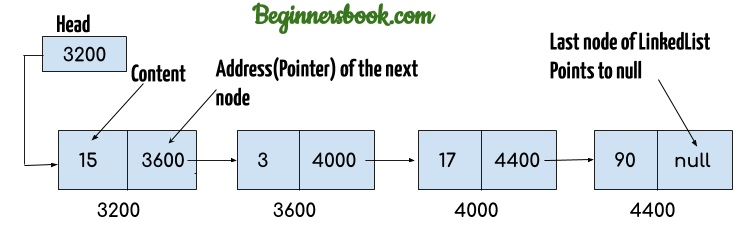
Let me explain the concept using this well-crafted representation of a LinkedList from BeginnersBook.

LinkedList representation

Let me list down the things you should know about LinkedLists.

  • Elements in a LinkedList are called nodes.
  • Head of a LinkedList contains the address to the first element in the list
  • The Last node of the LinkedList does not contain an address.
  • Each node has a content and the address to the next node except for the last node which only has the content.
  • These types of LinkedLists are called singly-linked lists.

There are also doubly-linked lists which are pretty much the same thing except for that the nodes of doubly-linked lists contain the address of the previous node in addition to other parts.

Features of LinkedList

1. Dynamic Memory Allocation

We don’t have to worry about defining a size to the LinkedList. The compiler does it for you while the program is being executed.

2. They don’t need adjacent memory locations

Because nodes contain the memory address of the next node, the nodes don’t have to be exactly positioned in adjacent locations like in arrays.

Creating a LinkedList

1. First Way
LinkedList<String> myLinkedList = new LinkedList<String>();
2. Second Way
LinkedList<String> myLinkedList = new LinkedList<>();

Adding elements to a LinkedList

        //Adding an element to the end of the list
        myLinkedList.add("Mahela");
        myLinkedList.add("Sanga");
        myLinkedList.add("Angie");

        //Adding an element to the first position
        myLinkedList.addFirst("First Guy");

        //Adding an element to the last position
        myLinkedList.addLast("Last Guy");

        //Adding an element to the 4th position
        myLinkedList.add(3, "Kusal");

Here is the console output of the code snippet.

[First Guy, Mahela, Sanga, Kusal, Angie, Last Guy]

Removing elements from a LinkedList

        //Adding an element to the end of the list
        myLinkedList.add("Thirimanne");
        myLinkedList.add("Mahela");
        myLinkedList.add("Sanga");
        myLinkedList.add("Angie");
        myLinkedList.add("Mahela");
        myLinkedList.add("Johnson");
        myLinkedList.add("Mavan");
        myLinkedList.add("Sanath");
        myLinkedList.add("Mahela");
        myLinkedList.add("Sanga");

        //Removes the first element in the list
        myLinkedList.remove();

        System.out.println("After remove() - " + myLinkedList);

        //Removes the first occurrence of the list
        myLinkedList.removeFirstOccurrence("Mahela");

        System.out.println("After removeFirstOccurrence - " + myLinkedList);

        //Removes the last occurrence of the list
        myLinkedList.removeLastOccurrence("Sanga");

        System.out.println("After removeLastOccurrence - " + myLinkedList);

Here is the console output of the above code snippet.

After remove() - [Mahela, Sanga, Angie, Mahela, Johnson, Mavan, Sanath, Mahela, Sanga]
After removeFirstOccurrence - [Sanga, Angie, Mahela, Johnson, Mavan, Sanath, Mahela, Sanga]
After removeLastOccurrence - [Sanga, Angie, Mahela, Johnson, Mavan, Sanath, Mahela]

Updating elements in the LinkedList

        //Adding an element to the end of the list
        myLinkedList.add("Thirimanne");
        myLinkedList.add("Mahela");
        myLinkedList.add("Sanga");
        myLinkedList.add("Angie");
        myLinkedList.add("Murali");
        myLinkedList.add("Johnson");

        //Updating an element of the linked list
        myLinkedList.set(2, "Guptill");

        System.out.println(myLinkedList);

Here is the console output.

[Thirimanne, Mahela, Guptill, Angie, Murali, Johnson]

Other Important Methods

1. clear()

Removes all the elements from the LinkedList

2. clone()

This method returns a copy of the existing LinkedList

3. offer(E e)

This method can also add a specified element to the LinkedList (to the end of the list in this case). offerFirst(E e) and offerLast(E e) respectively add the element as the first element or as the last element.

According to the Queue interface, the difference between offer() and add() is that add() throws a IllegalStateException if there is no space currently available. It will return true if adding is possible.

On the other hand, offer() will return false when there are issues with the capacity.

But since there is no space issues in LinkedLists, both of these methods can be treated as two methods with the same functionality.

4. peek()

This method returns the first element in the LinkedList. This method also has related methods like peekFirst() and peekLast() to retrieve those relevant elements.

You may have realized that getFirst() and peekFirst() ( or peek() ) are doing the same thing. Well, there is a difference. getFirst() method was introduced when LinkedLists were first introduced. The problem with this method is that it causes NoSuchElementException when there are no elements in the LinkedList.

peek() methods were introduced as a fix for this problem. peek() methods return a null if the LinkedList is empty. It does not cause the program to stop.

4. poll()

This method returns and removes the first element in the LinkedList. This also has its sibling methods pollFirst() and pollLast().

There are two methods that do basically the same thing. remove() methods (removeFirst() to be exact) and pop() method.

Let me simplify things. pop() and returnFirst() does the same thing and have the same issue. Both of them causes NoSuchElementException when the LinkedList is empty. But poll() returns null when the LinkedList is empty. So, I would recommend using the poll() when you want to remove the first element.

5. size()

Returns the size of the LinkedList.


This is it for LinkedLists. Thank you for taking the time to read the article. I hope you guys got a good understanding of LinkedLists now. If you learned something, go ahead and follow the blog to get notifications when I publish a new article. Stay Safe ✌

4 Real Reaons Why You are Procrastinating and How to Fight Them

Hello guys, I am back with another new article with some interesting facts and techniques that could be life-changing for someone. Today, I am going to talk about the real reasons why you are procrastinating and how to fight them.

1. You don’t believe in yourself

One of the reasons why most people procrastinate is because they don’t think that they can complete that task successfully. Well, I have actually experienced this many times. I’ll give you an example from own life.

One day I was asked to give a speech in front of my English class the following week. Well, I’ve got the stage fright. In that whole week, I was thinking about how I would it up. But, I did not prepare. It was the day before the big day when I realized that I didn’t even have a script to practice the speech. I somehow came up with a script and memorized the points. I did the speech and it went pretty. But one important thing that I realized when I was giving the speech is that I could have done it better if I prepared some more rather than wasting time thinking about how I would mess up.

You may have realized this by yourself as well. So, whenever you have to do something that you are not that confident, the best thing you should do is to prepare for it. Watching PewDiePie’s LWIAY videos when you have an assignment to submit in a few hours is not ideal. When you are not confident about doing something, research about it. Make it one of your obsessions.

2. Distractions

Another reason why you are procrastinating is that because you are being distracted with things that are more appealing to you than what you are supposed to do.

The Biggest Distraction Ever

Yes. Your smartphone is your biggest distraction. You don’t even realize how many hours you waste by looking into a screen.

In 2020, the WHO estimates the average global lifespan is 72 years, and if we assume that many people now start using social media as young as 10 years old, that means the average person will spend a total of 3,462,390 minutes using social media over their whole lifetime.

In other words, that’s nearly 6 years and 8 months on social media in their lifetime based on the projections for social media use in 2020

Obviously, usage will likely change within the next seven decades, so take that number with a grain of salt. But since the trend over the past few years has been for people to spend more and more time on social media, that means humans are on track to spend a decade or more time on social media in their lifetime.

Quote Source – BroadbandSearch

How about that? An average person spends 6+ years browsing through social media. I just quoted these facts to make you realize how much time you are wasting.

If you feel like you want to check how many hours you spend on your smartphone, I recommend you to use Digital Wellbeing app. I’ve been using it for some time now and I’ve saved a lot of time because of that app.

And once you minimize your distractions, you will realize a significant change. You will realize that you are much less likely to procrastinate when you are not getting distracted.

3. Having “Too Much” Time

When we have a lot of time to do some task, we are more likely to procrastinate thinking that we have a lot of time. I don’t think there is much to elaborate here since almost all of you know what I am talking about

4. It’s boring

You are more likely to procrastinate when you have to do something that doesn’t interest you. Even if the task is difficult, you will do the task if it is interesting. Our mind doesn’t like to do boring things.

How do we fight Procrastination?

1. Don’t follow pieces of advice blindly

What works for someone, might not work for you. Go ahead and experiment. If the advices does not make sense to you, try out something else.

2. Small Chunks and the Rewarding System

Break down your big tasks to small chunks. They will be sound less intimidating and that will motivate you to actually start doing the task without procrastinating.

And once you complete the task, reward yourself with something. This will make the task more enjoyable.

3. Deadlines before Deadlines

When you break your big task into smaller chunks, create deadlines for each chunk. These deadlines will push you to complete the task.

4. Remove Distractions altogether

Put your phone into Do Not Disturb mode when you are working

Uninstall social media apps from your phone.

Block yourself from using sites that don’t add anything to your life


That is it for today guys, Thank you for reading the article. I hope you guys learned something valuable today. Stay safe ✌

Java Fundamentals – Part 04

Hello guys, I am back with my 4th article in my Java Fundamentals series. I hope you guys understood the concepts I explained so far. Today, I am going to talk about Iterations in Java language.

Why iterations?

There is something that we do over and over again as humans. We call them habits. We can make our computer programs do something over and over again.

For example, we can make a program search a file for particular information or make it generate random numbers over and over again. There are 3 ways in Java to perform repetition.

1. While Loops

        //Part 1 - Declaring and initializing a variable
        int number = 1;

        //Part 2 - Looping 
        while (number <= 10){
            System.out.println("Number " + number);
            
            //Part 3 - Changing the value (Incrementing or Decrementing)
            number++;
        }

As you can see, we have 3 main parts in a while loop. The flow of this code snippet is going to go like this.

  • Declaring a variable (number) that is going to be used in the while loop
  • Checking if the number is lesser than or equals to 10.
  • Executing the code inside the while loop and incrementing the value of the number
  • Checking the condition again

The repetition process will happen until the condition in the while loop evaluates false. When that happens, the program will exit from the while loop and move on.

2. For Loops

For loop are very similar to the while loop. All we have to do is move those parts we discussed earlier. The same code in for loop looks like this.

        //All 3 parts are inside the for loop condition
        for (int number = 1; number <= 10; number++){
            System.out.println("Number " + number);
        }

As you can see, both the variable declaration part and changing its value has been brought inside the condition. The flow of a for loop goes like this.

  • Declaring the variable
  • Checking the condition
  • Executing the loop body
  • Changing the value

You might be wondering why we have two loop types if it is the same code. Well, there are is a big difference. We use a for loop when we know the number of iterations. We use a while loop when we don’t know the number of iterations.

For example, we can use a for loop for something like this.

        Random random = new Random();
        int magicNumber = 6;

        //Checking if the random generated number matches the magic number
        while (magicNumber != random.nextInt(10)){
            System.out.println("Trying again");
        }
        System.out.println("Found the magic number");

We can’t say, “Ok. You will find the magic number in ## many iterations”. In moments like this, we have to use a while loop.

And by now, you may have also realized that we can use a while loop anywhere.

3. Do While Loops

This is same as the while loop. The only difference is that we are executing the loop body before checking the condition for the first time.

        //Part 1 - Declaring and initializing a variable
        int number = 1;

        //Part 2 - Looping
        do {
            System.out.println("Number " + number);
            
            //Part 3 - Changing the value (Incrementing or Decrementing)
            number++;
        } while (number <= 10);

The flow of this loop goes like this.

  • Declaring the variable
  • Executing the loop body
  • Changing the value
  • Checking the condition

Nested Loops

This is same as nested if statements. When we use a loop inside a loop, we call it a nested loop.

        int numOfLines = 5;

        //This loop decides the number of rows
        for (int i = 0; i < numOfLines; i++) {

            //This loop handles the number of columns
            for (int j = 0; j <= i; j++) {
                System.out.print("* ");
            }

            //Printing the space
            System.out.println();
        }

This code snippet will print a triangle on the screen.

Triangle from the code

This is it for today guys. Thank you for reading the article. If you liked it please drop a like and share it among your friends. If you are new, subscribe and follow our blog to get notifications when I publish new articles. Stay safe ✌

Arraylists – Java Collections Framework

Hello guys, welcome to my new article series where I am going to discuss Java Collections Framework. To start it off, today I am going to talk about Arraylists in Java.

Why Arraylist?

You should always choose arraylists over arrays. We need to specify a fixed-length with an array. We don’t have to do that with Arraylists. Arraylists can grow or shrink according to the number of elements in the ArrayList. Arraylist class implements the List Interface in Java.

Creating an Arraylist

1. First Way
ArrayList<String> myArrayList = new ArrayList<String>();
2. Second Way
ArrayList<String> myArrayList = new ArrayList<>();

Adding Elements to the Arraylist

        // This adds the element to the end of the arraylist
        myArrayList.add("The Coding Cricketer");
        // This adds the element to the second index of the arraylist
        myArrayList.add(1, "Thisura");

So, adding Thisura to the first index of the ArrayList pushes Thenuka to the second index automatically.

Updating Elements of an Arraylist

        //Here is the current arraylist
        System.out.println(myArrayList);
        
        //Updating the first element of the arraylist
        myArrayList.set(0, "Java Arraylists");
        //After updating the arraylist
        System.out.println(myArrayList);

Here is the console output.

[The Coding Cricketer, Thisura, Thenuka]
[Java Arraylists, Thisura, Thenuka]

Removing Elements in the Arraylist

1. Removing by the value
        //Here is the current arraylist
        System.out.println(myArrayList);
        //Removing the first element of the arraylist
        myArrayList.remove("Thenuka");
        //After updating the arraylist
        System.out.println(myArrayList);

Here is the console output.

[Java Arraylists, Thisura, Thenuka]
[Java Arraylists, Thisura]
2. Removing by the index
        //Here is the current arraylist
        System.out.println(myArrayList);
        //Removing the first element of the arraylist
        myArrayList.remove(2);
        //After updating the arraylist
        System.out.println(myArrayList);

Here is the console output

[Java Arraylists, Thisura, Thenuka]
[Java Arraylists, Thisura]

Iterating through an Arraylist

        // This adds the element to the end of the arraylist
        myArrayList.add("The Coding Cricketer");
        myArrayList.add("Mahela");
        myArrayList.add("Sanga");
        myArrayList.add("Angie");
        myArrayList.add("Dilshan");
        
        //Iterating through the arraylist
        for (String element: myArrayList) {
            System.out.println(element);
        }

And the console output is down below

The Coding Cricketer
Mahela
Sanga
Angie
Dilshan

Sorting an Arraylist

We are using the Collections class in Java to do the sorting.

        // This adds the element to the end of the arraylist
        myArrayList.add("The Coding Cricketer");
        myArrayList.add("Mahela");
        myArrayList.add("Sanga");
        myArrayList.add("Angie");
        myArrayList.add("Dilshan");
        //Sorting the arraylist
        Collections.sort(myArrayList);
        //Iterating through the arraylist
        for (String element: myArrayList) {
            System.out.println(element);
        }

Here is the console output with the sorted ArrayList

Angie
Dilshan
Mahela
Sanga
The Coding Cricketer

Other Important Methods

1. Finding the value from the index
        // This adds the element to the end of the arraylist
        myArrayList.add("The Coding Cricketer");
        myArrayList.add("Mahela");
        myArrayList.add("Sanga");
        myArrayList.add("Angie");
        myArrayList.add("Dilshan");
        //Finding the value in the second index
        System.out.println(myArrayList.get(2));

This is going to print Sanga to the console.

2. Finding the index from the value
        // This adds the element to the end of the arraylist
        myArrayList.add("The Coding Cricketer");
        myArrayList.add("Mahela");
        myArrayList.add("Sanga");
        myArrayList.add("Angie");
        myArrayList.add("Dilshan");
        //Finding the index with the value
        System.out.println(myArrayList.indexOf("Angie"));

This is going to print 3 to the console.

3. Getting the size of the ArrayList
        // This adds the element to the end of the arraylist
        myArrayList.add("The Coding Cricketer");
        myArrayList.add("Mahela");
        myArrayList.add("Sanga");
        myArrayList.add("Angie");
        myArrayList.add("Dilshan");
        //Getting the size of the arraylist
        System.out.println(myArrayList.size());

This is going to print 5 to the console.

4. Checking if the ArrayList contains a certain value
        // This adds the element to the end of the arraylist
        myArrayList.add("The Coding Cricketer");
        myArrayList.add("Mahela");
        myArrayList.add("Sanga");
        myArrayList.add("Angie");
        myArrayList.add("Dilshan");
        //Returning a boolean if a certain value is in the arraylist
        System.out.println(myArrayList.contains("Mahela"));

This prints true to the console.

5. Clearing the ArrayList
        // This adds the element to the end of the arraylist
        myArrayList.add("The Coding Cricketer");
        myArrayList.add("Mahela");
        myArrayList.add("Sanga");
        myArrayList.add("Angie");
        myArrayList.add("Dilshan");
        //Printing the current arraylist
        System.out.println("Printing the current arraylist - " + myArrayList);
        //Finding the index with the value
        myArrayList.clear();
        //After clearing the arraylist
        System.out.println("After clearing the arraylist - " + myArrayList);

Here is the console output

Printing the current arraylist - [The Coding Cricketer, Mahela, Sanga, Angie, Dilshan]
After clearing the arraylist - []

These are the basic things you guys should know about ArrayLists. I hope you guys learned something new from the article. If you did, drop a like and share the article for anyone who might be interested in learning these things. Thank you for reading the article. Stay safe ✌

Java Fundamentals – Part 3

Hello guys, I am back with the 3rd article of Java Fundamentals article series. I hope you guys are enjoying and learning the concepts clearly. Today I am going to talk about Selections in Java.

If Statements

Selections are the backbone of programming. The reason why we do programming is to alter the default behaviour of something by checking a condition. If conditions are there in every programming language that has ever been invented.

        int age = 21;
        
        //Checking if the age is higher enough to vote
        if (age > 18){
            System.out.println("You can vote");
        } else {
            System.out.println("You are not old enough to vote");
        }

This is the basic structure of an if statement. We check a condition and we make the program do something if the condition is true. If not, we make the program do something else.

We can use comparison operators and logical operators when writing our conditions

Comparison Operators

  • > means greater than
  • < means less than
  • == means equals
  • != means not equal to
  • <= means less than equal to
  • >= means greater than or equal to

Logical Operators

  • & means Logical AND
  • && means short circuit AND (I’ll explain later in the article)
  • | means Logical OR
  • || means short circuit OR (I’ll explain later in the article)
  • ! means Logical NOT

The Short Circuit Concept

These operators have been introduced to improve the performance of your program. I recommend using these operators all the time.

        int age = 17;
        boolean isAlive = true;

        //Checking if the age is higher enough to vote
        if (age > 18 && isAlive){
            System.out.println("You can vote");
        }

In this code snippet, when we use the && operator, we are not going to check the second condition at all since the first condition is false. Because the compiler knows that when one condition is evaluated false, the whole condition set is going to be false regardless of the result. But if the first condition was true, the compiler would check the second condition as well.

In comparison, if we used the & operator here, the compiler would always check both conditions regardless of the result of the first condition.

Nested IF conditions

Here we are talking about if conditions inside if conditions.

        int value = 6;
        
        //Checking what the value is
        if (value > 0 && value <= 10){
            if (value < 5){
                System.out.println("The value is below 5");
            } else {
                System.out.println("The value is between 5 and 10");
            }
        }    

In this code snippet, we are not going to check inside the outer if condition if it is not true. This is going to save computer processing power and will speed up the overall process. There are much better ways to do this. I will be discussing them later.

Switch Statement

This statement is not being used that much. This is an alternative way to writing a lot of if statements

        int dayOfTheWeek = 3;

        //Checking what the value is
        if (dayOfTheWeek == 1){
            System.out.println("It is Monday");
        } else if (dayOfTheWeek == 2){
            System.out.println("It is Tuesday");
        } else if (dayOfTheWeek == 3){
            System.out.println("It is Wednesday");
        } else if (dayOfTheWeek == 4){
            System.out.println("It is Thursday");
        } else if (dayOfTheWeek == 5){
            System.out.println("It is Friday");
        }

We can alternate the above code with a switch statement.

        int dayOfTheWeek = 3;

        //Checking what the value is
        switch (dayOfTheWeek) {
            case 1 :
                System.out.println("It is Monday");
                break;
            case 2 :
                System.out.println("It is Tuesday");
                break;
            case 3 :
                System.out.println("It is Wednesday");
                break;
            case 4 :
                System.out.println("It is Thursday");
                break;
            case 5 :
                System.out.println("It is Friday");
                break;
        }

We should always add a break statement at the end of each switch block to stop condition block from being executed regardless of the condition status.


This is it for today’s article guys. Thank you for taking the time to read my article. I hope you understood the concepts clearly. If you have any doubts, feel free to drop a comment down below. If you liked the article, drop a like and share it among your friends. Don’t forget to subscribe so you won’t miss future articles. Stay Safe ✌

6 Simple Habits to Stop Overthinking

Hello guys, I am back with another valuable article that you could add to your knowledge book. Today I am going to talk about 10 simple habits that you could build to prevent yourself from overthinking.

1. Set Shorter time limits for your decisions

Set time limits

Image Source

This is related to a well-known fact that when we set a deadline for ourselves to do something, we are more likely to complete in the given time. This discusses a very similar concept to Mel Robbins’ 5-second rule.

When you are taking small decisions like replying to emails or what to eat for breakfast, set a small time limit for yourself for like 30 seconds. It is always better if you could bring that time down as you move along with this concept.

And when you are taking somewhat bigger decisions that you usually take you weeks or months to decide, bring that time down to one day. That is it. You have one day to make your decision. Whatever you decide at the end of the day is final. Always be bold. Take risks. Choose the harder path. YOLO 🤘

Mel Robbins’ 5 Second Rule

Video Source – KnownForSolutions Youtube Channel

2. Don’t stress yourself out

Image Source – Heart.org

Win the morning, you win the day. Start your morning with a fresh workout or reading a book or a meditation session. I would always recommend going for a good sweaty workout. You will feel so much energized and pumped to crush your goals.

The next thing is to understand that you can’t multitask. It has been proven by tons of researches. If you have a photographic memory like Nicola Tesla, go ahead and multitask. If you don’t have one, please don’t try to multitask. It is just a waste of time. Take one task at a time. Focus on that task and finish it. Start the morning by doing the most important task for the day. And always remember to take regular breaks in between work.

Another important thing is don’t fill your mind with social media crap. Your social media consumption clutters your mind without you even knowing it. Haven’t you felt like less motivated and stressed out after scrolling through Instagram and Facebook? I bet you have. Just stop using social media when you are working. After you do this, you will feel how clear your mind is.

3. Widen your perspective

Widen your Perspective

Image Source

When you feel like you are taking more time to make a decision, try to widen your perspective. Think about whether your decision is going to even matter in 5 years. Asking yourself this question would help you clear out a lot of barriers and just do it.

This would help you preserve your energy to utilize them in taking much more important decisions.

4. Don’t fear vague fears

When you feel like you are overthinking something, ask yourself, “What is the worst thing that could happen?“.

Well, NO. You are not going to die, bro

You are thinking way too much. When you ask yourself this question, you will realize that the worst thing that could happen is not that bad.

5. Have a schedule. Work through it

I have realized that I am tempted to overthink when I don’t have a clear schedule on what exactly I should do at that particular time. If you always have a schedule, then you know what you are supposed to be doing at that moment. This way, you are more likely to do the task rather than thinking about what to do.

Besides, you should always have deadlines for your tasks. Having deadlines make you push yourself to finish that particular task at the given time. Make deadlines work for you, not against you. Don’t just stress out. Get the best out of you.

Take it easy. Take small steps. Just take one task at a time. Just focus on completing that one small task.

6. You can’t control everything

This is more of an advice, rather than a habit. Why I am adding this as a habit is that you need to constantly remind yourself this. You should make yourself realize that you can’t control everything that happens in life. What you can is to choose how you react to it.

Yes, it is best to take responsibility for everything that happens around you. They are saying that for a reason. When you take everything into your hands, you have no one to blame too. When we think this way, we are going to take action and make stuff happen.

But after all of that, there is still be somethings in life that you could not have done anything about. You have to learn to let those kinds of stuff go.


That is it for today guys. Thank you for reading my article. I hope you learned something valuable. If you did, please make sure to hit the subscribe button to get notifications when I publish a new article. Stay Safe ✌

Java Fundamentals – Part 2

Hello guys, I am back with the 2nd article of my Java Fundamentals article series. Today I am going to discuss Functions and Parameters.

What is a Function?

Large programs that contain large codebases are complex. So, understanding the code and debugging is harder. The best answer we have for this issue is breaking down the code into small units. After breaking down the code into units, we can call and invoke that each piece of code calling by their name.

These small units are called functions. When we call a function by its name, we can invoke whatever the code that is inside the function body. When I say this, the first thing that would come to your mind as a programmer is, “Yes, but methods does the same thing, right?”. Well, yes, you are right. Let me clear the confusions.

Functions vs Methods

What both functions and methods do are identical. They can take in values as arguments and can return values.

But the difference between these two is that a function is an individual unit. A function can exist on its own without any help.

public class Test {
    public static void main(String[] args) {

        //Calling the function
        myFunction(5);

        //Calling the method
        TestClass testClass = new TestClass();
        testClass.myMethod(5);
    }

    //Defining the function
    public static void myFunction(int num) {
        System.out.println("Hey, I stand alone. I am stronger");
        System.out.println("I have " + num + " points");
    }
}

class TestClass{
    public void myMethod(int num){
        System.out.println("Hey, I always have my family with me. I am stronger");
        System.out.println("I have " + num + " points");
    }
}

So, as you can see, a method exists only if there is a class. We can only call methods once we create an object of those classes.

Parameters vs Arguements

Let me solve this little debate too. I have heard so many beginners use these two words interchangeably.

A parameter is a variable in the method/function definition. In the code snippet, num is a parameter.

Arguments are the values that we pass into those methods/functions. In the code snippet, 5 is an argument.

Now I hope you understand why I specifically used the word functions in the description.

Local vs Global Variables

public class Test {
    
    //Declaring the global variable
    public static final int NUM_OF_ROUNDS = 10;
    
    public static void main(String[] args) {

        //Declaring the local variable
        int currentRound = 1;
        
        //Iterating 10 rounds
        for (currentRound = 1; currentRound <= NUM_OF_ROUNDS ; currentRound++) {
            System.out.println("This is round number " + currentRound);
        }
    }
}

If you still didn’t understand by reading the code snippet, a local variable is defined inside a function and it is only valid inside that scope.

A global variable on the other hand is defined outside of a function (inside the class) and can be used inside the scope of the class.

Can we define two variables with the same name?

Yes. We can do that as long as those variables are not in the same scope.

Variable types

1. Instance Variables

When a variable which is declared inside a class and outside all the methods and blocks, we call it as an instance variable. The scope of instance variables is throughout the class except for static methods.

2. Class Variables

When a variable is declared inside a class, outside all the blocks and is marked static, we call it a class variable. The scope of class variables is the scope of the class itself.

3. Local Variables

All other variables that are not either class or instance variables are called local variables. The scope of local variables is the block in which it is declared.


This is the end of the second article of this article series. I hope you guys learned something valuable today. Thank you for taking the time to read the article. If you liked it, make sure you hit the subscribe button and share the article among your friends. Stay safe ✌